Artificial intelligence (AI) is the name given to systems that can produce responses, recommendations, or predictions from the information they receive. You may already encounter it when organizing photos, using automatic translation, or asking for help writing a text. In this guide, you will understand what changes with generative AI, what to expect from an assistant, and how to make a thoughtful first attempt.
What is artificial intelligence?
In simple terms, AI brings together techniques that allow a system to analyze an input and produce an output that is useful for a particular purpose. That output might be a prediction, a recommendation, an automated decision, or content. This is a practical explanation, not a promise that a machine thinks like a person. The OECD definition of an AI system also emphasizes that different systems have different degrees of autonomy.
Think of an app that recognizes objects in a photo, a filter that helps identify unwanted messages, or a service that suggests a route. All of them can use AI, but they do not work the same way or solve the same problem. That is why asking only “Does this tool have AI?” is often less useful than asking “What task does it help me do?”
What is generative AI?
Generative AI is part of this broader field, focused on creating new content from instructions and examples learned during model development. Depending on the tool, it can generate or transform text, images, audio, video, or code. A text assistant can help draft a message; an image generator can create a visual composition. That does not mean every tool does all of these things.
Generated content is not necessarily a copy of a particular source, nor is it proof that an answer is true. The result depends on the model, the instructions it receives, and the features the tool offers. Even when the output looks convincing, the person who will use it still needs to evaluate it.
How does an AI assistant generate an answer?
A model is the component trained to find patterns in data and generate outputs. The tool is the product you interact with. An assistant is a way of presenting that tool through conversation, often with additional features. Distinguishing these three terms helps explain why different assistants can use different models, and why the same model can appear in products with different functions.
When it receives your message, a text assistant considers the instructions and context available in that interaction and generates a sequence of responses based on learned patterns. In plain language, it calculates plausible continuations of the text. This probabilistic process can produce useful explanations, but also incorrect statements that sound confident. The NIST generative AI profile describes this risk of false content presented convincingly.
You should not assume that the assistant searches the internet for every question, either. Some tools offer search or access to external sources; others answer without that feature. Their knowledge may be outdated, and a tool does not permanently learn from every individual conversation simply because you corrected an answer. Check the features and terms of the product you are using.
What can AI do well?
A good first use is asking for help with tasks you can review. AI can suggest an email structure, turn notes into an initial outline, propose questions for studying a topic, explain a concept differently, or offer alternative titles. It can also help compare criteria you have defined, such as clarity, time required, and delivery format.
These uses work better when you know your goal and can verify the result. For example, asking for a list of topics for a presentation saves you the work of starting with a blank page. Then you decide what really matters, correct unsuitable examples, and adjust the language for your audience. The benefit is support for the process, with your review still needed.
What does AI not do so well?
An assistant can get facts wrong, invent references, misunderstand a question, or leave out an important condition. If you ask “What is the best option?” without saying for whom, for what purpose, and within what limits, the answer tends to fill in the gaps on its own. It may sound precise even when it relies on assumptions that do not fit your situation.
There are also tasks where up-to-date information and responsibility are essential. Rules, prices, service availability, and technical guidance change. Medical, legal, and financial questions may require qualified professionals and current sources. Use AI to organize questions or understand terms, but keep the final decision in human hands. When a source is cited, open the original document and check that it exists and supports the claim.
What is a prompt?
A prompt is the instruction or question you give the tool. It can be a short sentence, a detailed request, or, when the product supports it, text accompanied by an image, audio, or a file. A clear prompt does not need special formulas: it needs to say what you want, what context is necessary, and how you intend to use the answer. OpenAI’s official prompt guidance recommends clarity, context, and successive adjustments.
Compare a vague request with a more useful one:
“Write a text.”
“Write an email draft inviting residents of the building to a meeting about saving water. Use a friendly tone and no more than 120 words, explain that the date has not been set yet, and end by asking for suggested times. Do not invent decisions that have already been made.”
The second request specifies the audience, goal, length, tone, and an important restriction. Even so, the resulting text will only be a draft: you should check whether the information matches the real situation before sending it.
How to start using AI in practice
Start with a small task you already understand. That makes it easier to notice when the answer helps and when it needs correction.
- Choose a real task. For example, organize ideas for a message or create an initial reading plan.
- Explain your goal. Say what you need to obtain and who will use the result.
- Provide only the necessary context. Include useful constraints without adding personal or confidential data that is not essential.
- Ask for a format. You can request bullet points, a paragraph, a checklist, or two alternatives to compare.
- Read critically. Notice whether the answer meets the request, omits anything, or makes claims you cannot confirm.
- Adjust the request. Ask for a shorter version, a more concrete example, or a correction to a specific point.
- Verify what matters. Consult reliable sources before using facts, quotations, instructions, or recommendations in an actual decision.
You do not need to get the first prompt right. The interaction improves as your goal becomes clearer and you explain what was missing from the previous answer. If the task matters, keep the final version as your own reviewed work, not something automatically approved by the tool. To practice this in a first conversation, follow the step-by-step guide to getting started with ChatGPT.
Examples of tasks for beginners
In everyday life, you can ask for a list of steps for organizing a move, turn scattered notes into an agenda, or compare two ways of presenting an idea. For studying, try asking for a simple explanation of a concept followed by questions to test your understanding. Then compare the explanation with your class material or a reliable source.
For writing, use the tool to get an outline and review clarity, without attributing unverified facts to it. For creative work, ask for three visual directions for a poster before choosing one. When comparing tools, describe the task and the criteria that matter to you. In all these cases, AI offers possibilities to evaluate; it does not guarantee a result ready for use.
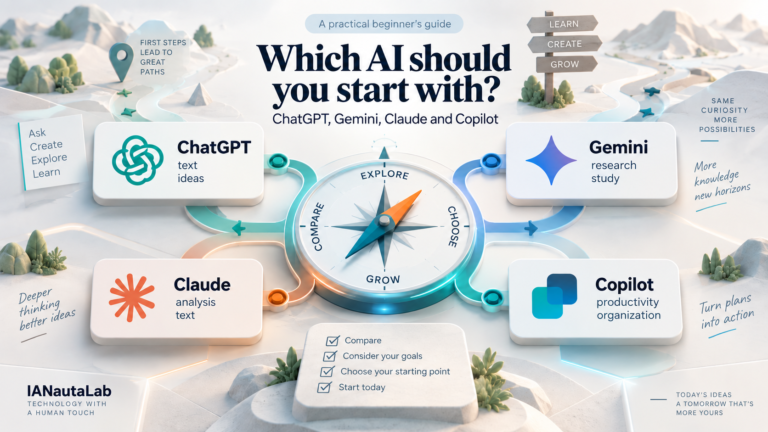
Which AI should you start with?
There is no single choice for everyone. Some assistants are presented primarily as conversational tools; others emphasize integration with documents, search, or content creation. Features also depend on the product version and can change. Instead of looking for an overall winner, start with the task you want to accomplish and check whether the tool offers the feature you need.
If you are still unsure where to start, IANautaLab’s Find out which AI to use tool organizes four questions and offers an initial suggestion based on explicit criteria. It does not declare one option universally better; it provides a starting point for testing a task of your own. To understand the differences between four assistants before choosing, also read ChatGPT, Gemini, Claude and Copilot: which AI should you start with?.
Basic precautions when using artificial intelligence
Before accepting an answer, identify what is a suggestion and what is a verifiable claim. Confirm dates, names, rules, numbers, and references with appropriate sources. If the topic could affect health, money, rights, or safety, seek qualified human guidance. The need for review grows with the potential impact of an error.
Avoid entering other people’s documents, passwords, personal data, or sensitive information unnecessarily. Read the privacy terms of your chosen service, especially if you plan to upload files or work content. Also review the tone, possible biases, and your right to use generated images or text before sharing or publishing. The NIST AI risk management framework emphasizes understanding limitations and maintaining human oversight appropriate to the use.
Next step
Choose a simple task, make a request with a goal and context, and check the result. To keep learning the basics, explore the AI for beginners hub. If your immediate question is which assistant to try, use Find out which AI to use and compare the suggestion with what your task actually requires.