You know what you need to say, but the message will not come together. The first sentence gets long, one explanation leads to another, and by the end the main request almost disappears. An AI assistant can help separate ideas, propose a draft, and compare versions. The decision about what to communicate remains yours, however: the assistant does not know facts you have not shared or your relationship with the recipient.
In this guide, we will start with a simple situation: asking to reschedule an appointment. The process moves from intention to final version through context, drafting, revision, tone, and checking. Not every message needs every step. A one-line note may only need a careful read; a more delicate email deserves thoughtful revision. Later, three synthetic texts show what one real rewriting round changed, and what still depended on editorial review.
What can AI do for your writing?
Even in simple chat, you can ask for help organizing topics, creating a first version, shortening sentences, eliminating repetition, or trying a friendlier tone. You can also request two alternatives and choose passages from each. This does not require connecting email, WhatsApp, or files: you type the necessary context, read the answer, and decide what to use.
AI works with the material it receives and can fill gaps convincingly but incorrectly. Treat every version as a proposal. Check names, times, reasons, deadlines, and promises before sending. An elegant sentence that changed the meaning of your request is not an improvement. If you are starting to use an assistant, the guide to getting started with ChatGPT shows how to converse and adjust an answer; this page’s writing method does not depend on that product.
Start by defining what you want to communicate
Before asking for a text, answer these questions for yourself: what is the goal? Who will read it? Which details are essential? What response do you expect? Is there anything that should not be stated? These questions seem small, but they prevent a well-written message from failing to do what it needs to.
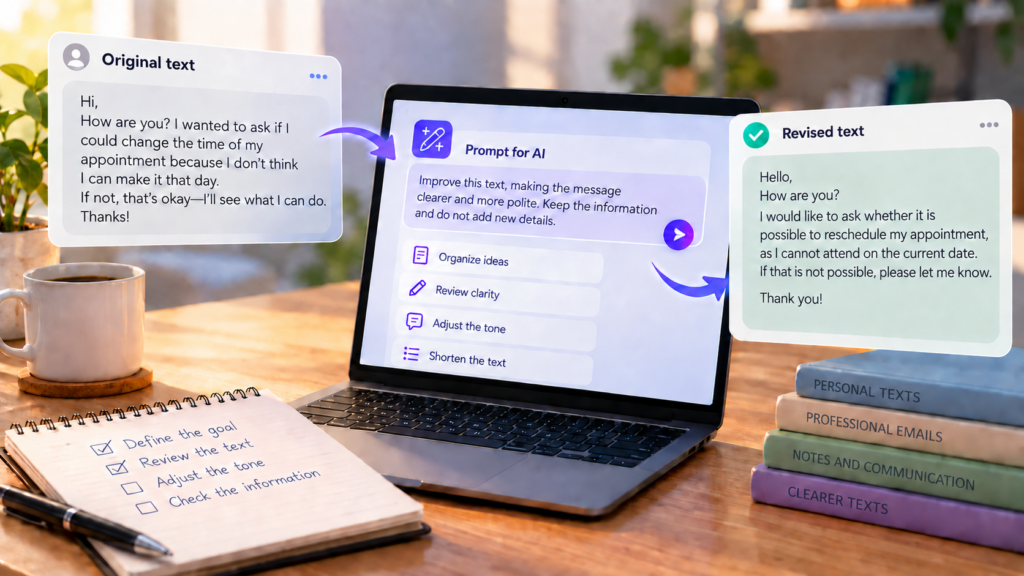
Imagine someone with an appointment on Thursday at 2 p.m. who cannot attend. They want to know whether another time is available the following week. They have not given a reason for the change and do not want to suggest that any time works. We do not need a name, phone number, address, or registration number to demonstrate how to formulate the message.
Original text — fictional editorial demonstration: “Hi, so, about Thursday, I checked and it’s really going to be difficult, because things changed and I don’t think I can make that time. I wanted to sort that out, if you could tell me how it works, maybe next week would be better. Let me know.”
Informality is not the problem. The recipient does not know which appointment is involved, its current time, or what response they need to give. The clear intention is to reschedule Thursday’s 2 p.m. appointment and ask about options the following week. No reason was supplied; it should not appear in the text as a fact.
Request 1 — organize the intention: “I’m going to ask to reschedule an appointment set for Thursday at 2 p.m. I want to ask whether times are available the following week. I will not give a reason for the change and cannot yet confirm a new time. Summarize the message’s goal in one sentence and list only the information needed to write it. Do not invent dates, explanations, or availability.”
This request checks the direction before drafting. If the answer says the person prefers Monday or had an emergency, correct it: that information was not provided.
How to ask AI for a first draft
With the goal defined, ask for a short draft and say whom it is for. Provide the current appointment and expected action. When the text involves a request, one structure often helps: establish the subject, make the request, and indicate what answer you await. It is not a rigid formula; it makes the message easy to understand.
Request 2 — create the draft: “Write a friendly message to the place where I have an appointment scheduled for Thursday at 2 p.m. I cannot attend at that time. Ask whether there are rescheduling options the following week and request the available times. Keep the message brief. Do not add information, dates, explanations, or promises absent from the original text and this context.”
First draft — fictional editorial demonstration: “Hello! I have an appointment scheduled for Thursday at 2 p.m., but I cannot attend. I would like to know whether times are available the following week to reschedule it. Could you let me know the options? Thank you.”
The draft identifies the appointment and asks for a concrete response without creating a reason. Some choices remain yours: the greeting can change with the channel; “Thank you” should be adapted to how you prefer to express yourself; and the place may request identifying information when receiving the message. If necessary, provide it directly to the recipient through the appropriate channel, not unnecessarily to an assistant.
How to improve text you have already written
You do not need to start from scratch. If you already have a message, paste only the necessary part and say what kind of revision you want. “Improve this text” is vague: the answer may become longer, more formal, or change an intention that was correct. A useful instruction identifies the problem and sets limits.
In the appointment example, the original mixes an imprecise explanation with the request. A revision should make the current time and question about the following week visible. It does not need to turn the person into someone who writes ceremoniously.
Request 3 — revise existing text: “Reorganize this message so the recipient understands which appointment I need to reschedule and what answer I expect. Use direct sentences and a friendly tone. Preserve the facts provided: Thursday at 2 p.m. and a request for options the following week. Do not add a reason, exact date, confirmed new time, or promise of availability. Text: [paste only the necessary passage here].”
After — revised version, fictional editorial demonstration: “Hello! I cannot attend the appointment scheduled for Thursday at 2 p.m. Do you have times available the following week to reschedule? Please send me the options if possible. Thank you.”
The change is noticeable: the opening presents the fact, the question makes the expected action explicit, and the vague explanation disappears. Before using it, check whether “appointment” is enough for the recipient to locate the booking and whether the channel requires other identification. Also confirm that the following week is the period you want. The original and revised versions are examples created for this article, not outputs of a test with a specific service.
How to adjust tone without losing naturalness
Tone is more than formality. A message can be objective without sounding rude, professional without elaborate phrases, and informal without omitting the request. Consider your relationship with the recipient: a note to someone close, a request to a service team, and a work email call for different choices. In every case, intention and facts should stay the same.
For the appointment, “Let me know” is brief but unspecific. “Could you let me know the available times?” guides the response without requiring ceremony. If you usually write more directly, remove “Thank you”; if you prefer a greeting, keep it. The final version needs to sound like something you would send.
Consider another situation, separate from rescheduling. Someone needs to ask a colleague for an updated file to finish a presentation. They have not stated a deadline for receiving the material.
Before — fictional editorial demonstration: “Hi, can you send me that new file? I need it to finish the presentation. Thanks!”
Request 4 — adjust the tone: “Adapt this request into a brief professional email. The recipient is a colleague; I need the updated version of the file to finish a presentation. Keep the request friendly and direct. Do not invent a delivery deadline, file name, or urgency. Text: [paste the message].”
After — fictional editorial demonstration: “Hello! Can you send me the updated version of the file? I need it to complete the presentation. Thank you!”
The request became more precise without resorting to “I hereby write” or pretending there is urgency. You still need to check whether “updated version” identifies the file for that colleague. If not, add the correct name yourself. AI cannot guess it.
How to shorten messages without losing information
Shortening does not mean deleting everything that looks like a detail. First, mark the main goal, information that enables action, and expected response. Then look for repetition, introductions that add no context, and explanations you do not need to share. The ideal length depends on the situation: a complex instruction requires more words than a simple note.
Imagine a notice for someone who shares a home. A package delivery moved to Friday between 1 and 5 p.m., and someone needs to know whether the other person can receive it. The text below repeats the subject before reaching the question.
Before — fictional editorial demonstration: “Hi! I was looking at the delivery of that package and saw a change in the estimate. Before, it looked like it would arrive on another day, but now the information I saw was Friday between 1 and 5 p.m. Since I might not be home then and was wondering what to do, I wanted to know whether you’ll be around to receive it if it arrives while I’m out. Can you let me know whether you can?”
Request 5 — shorten thoughtfully: “Shorten this note for someone who shares my home. Preserve the fact that delivery changed to Friday between 1 and 5 p.m. and the question about whether they can receive the package. Do not state that they will be home or I will be out; neither is confirmed yet. Remove repetition and keep a natural tone. Text: [paste the note].”
After — fictional editorial demonstration: “The package delivery changed to Friday between 1 and 5 p.m. Could you receive it if it arrives during that time? Please let me know.”
The tracking-check story and repeated phrases are gone. The new window and question requiring an answer remain. Before sending, check the delivery notice to confirm the day and time window are still correct. If there are special instructions for receiving the package, include them; this example provides none.
How to check whether AI changed the meaning
Compare the draft with your notes, not just the attractive text returned by the assistant. Read it in three passes. First underline facts: who, what, when, and how much. Then examine requests and commitments: did the version start guaranteeing something you only wanted to ask? Finally, read as the recipient: is it clear what needs an answer?
For rescheduling, “Are there options the following week?” is a question. “I can attend at any time the following week” would be invented availability. “I cannot come for health reasons” would also add a fact. Even a small change, Thursday at 2 p.m. to Friday at 2 p.m., can undermine the request. If AI summarizes too much and deletes the current time, restore it.
One way to ask for help checking is: Request 6 — verify differences: “Compare my original text with the revised version. List preserved facts, unsupported added facts, and removed information separately. Indicate where the tone or expected action changed. Do not rewrite yet; I want to decide what to correct. Original: [text]. Revised: [text].” The assistant may overlook something too. Use the comparison to guide your own checking, especially with dates, numbers, or commitments.
Before pasting any text into a service, remove what it does not need to see: passwords, personal documents, customer data, private conversations without permission, and confidential professional information. Replace sensitive details with generic descriptions when sufficient. If the message concerns health, contracts, rights, or finances, AI can help organize the language but does not replace verification with appropriate sources or professional advice. And an answer in chat does not mean the message was sent: confirm sending in your chosen channel.
Three everyday texts: what one real round changed
To complement the constructed examples above, we created three synthetic texts and asked ChatGPT with free access to rewrite them. The answers below come from the first round of each request, recorded on October 2, 2026; the interface did not display the model. The texts contain no real personal or company data. These are three editing examples, not a comparison between tools or a guarantee about other answers.
A note that hardly needed changing
Before: “Hi! I can’t return the book to the library today. Can I bring it tomorrow after 6 p.m.? If that time doesn’t work, I can leave it at the front desk on Friday. Tell me which option is better for you.”
Request excerpt: “Make the message clearer and friendlier without artificial formality. Preserve both alternatives and their times. Do not add facts, promises, people, dates, or explanations.”
AI answer: “Hi! I can’t return the book to the library today. Can I bring it tomorrow, after 6 p.m.? If that time doesn’t work, I can leave it at the front desk on Friday. Tell me which option is better for you.”
What worked: both alternatives and their timing were preserved. What to review: the initial text was already clear; the answer mainly changed a pronoun and punctuation in the original Portuguese. A rewrite is not worth accepting just because it came from AI.
Reviewed final version: “Hi! I can’t return the book to the library today. Can I bring it tomorrow after 6 p.m.? If that time doesn’t work, I can leave it at the front desk on Friday. Which option is better for you?” Editorial review made the final question more direct without adding a reason for the delay.
An email with a deadline and an important restriction
Before: “Subject: proposal review. Hello, team. The meeting to discuss the proposal is scheduled for October 8 at 2 p.m. I need to receive comments in the document by October 6 at 5 p.m. to consolidate the points. The budget has not been approved yet. Therefore, we cannot confirm the delivery date in this message. Thank you.”
Request excerpt: “Reorganize the email to make it easier to read. Preserve all dates, times, requests, and the restriction concerning budget and delivery. Keep a simple professional tone.”
AI answer (excerpt): “The meeting to discuss the proposal is scheduled for October 8 at 2 p.m. I need to receive comments in the document by October 6 at 5 p.m. to consolidate the points.” It also retained: “The budget has not been approved yet. Therefore, we cannot confirm the delivery date in this message.” The answer opened with “Proposal review” and separated the greeting and paragraphs.
What worked: facts and the limit on promises were preserved; division into blocks made reading easier. What to review: the answer removed the “Subject:” marker, useful when sending an email. Visual organization does not eliminate checking the deadline and restriction.
Reviewed final version: “Subject: Proposal review. Hello, team. The meeting to discuss the proposal is scheduled for October 8 at 2 p.m. I need to receive comments in the document by October 6 at 5 p.m. to consolidate the points. The budget has not been approved yet. Therefore, we cannot confirm the delivery date in this message. Thank you.” In the sent message, these passages can occupy separate lines and paragraphs.
A notice where nobody can miss the deadline
Before: “Notice to residents: the service elevator will be out of service on October 12 from 9 a.m. to noon for preventive maintenance. The passenger elevator will remain operational. Anyone with a move scheduled during this period must contact management by October 9 to arrange another time window. This notice does not change other reservations.”
Request excerpt: “Rewrite the notice directly and unambiguously. Preserve all dates, times, conditions, and reservation information.”
AI answer: under the heading “Notice to residents,” the text retained: “The service elevator will be out of service on October 12 from 9 a.m. to noon for preventive maintenance. The passenger elevator will remain operational.” It also preserved contacting management by October 9 for moves during that period and the qualification about other reservations. The answer separated the text into paragraphs.
What worked: times, the action channel, and the qualification about reservations remained. What to review: the source was already direct; the observed improvement was mainly presentation. Before using an actual notice, someone needs to confirm the date, times, and channel with management.
Reviewed final version: “Notice to residents. The service elevator will be unavailable on October 12 from 9 a.m. to noon for preventive maintenance. The passenger elevator will remain operational. If you have a move scheduled during that period, contact management by October 9 to arrange another time window. Other reservations remain unchanged.”
In all three cases, the AI answer was a proposal. The final version resulted from checking every fact and deciding whether the change actually helped. The examples show both improved presentation and situations where the original text already performed the task well.
Common mistakes when using AI to write
The first mistake is providing little context and expecting the assistant to fill in the rest. If you do not say whom you are writing to and what you expect to receive, the version may be fluent and useless. The second is accepting the first answer because it sounds confident. Compare it with the facts and request a specific change: “Make the question more visible” helps more than “Improve it.”
It is also common to confuse professionalism with excessive formality or cut so much that the recipient cannot act. Try reading the message aloud: would you speak that way? Would the person know what to answer? If a sentence sounds like a promise you did not make, remove it. If essential information disappeared, restore it. AI offers alternatives; your voice and responsibility for sending remain yours.
Try improving a text of your own
Choose a short message you have not sent yet. Beside it, write one sentence stating the goal and expected answer. Remove sensitive data before taking it to an assistant. Ask for a revision with clear limits, compare before and after, and adapt the tone to the recipient. Check every fact, especially dates, numbers, and promises. Finally, replace any expression that does not fit your writing style. Only then use the text in the appropriate channel.
If formulating the first request is difficult, the Everyday task prompt generator can help structure the question. It does not know your situation on its own or check facts for you. For other everyday AI uses, see 15 practical ways to use AI in everyday life; here the benefit is learning to make better choices about text that remains yours.